
One photo a day,
beautifully framed.
Just keep taking photos. One photo a day is chosen for you and put in a frame. Stand an old iPhone or iPad somewhere you'll see it, and that device becomes the frame.
No account, no sign-up. Your photos stay on your device.
How it works
All you do is keep taking photos
Take photos
One photo a day is picked for you, favouring people and pets. Want a different one? Tap it.
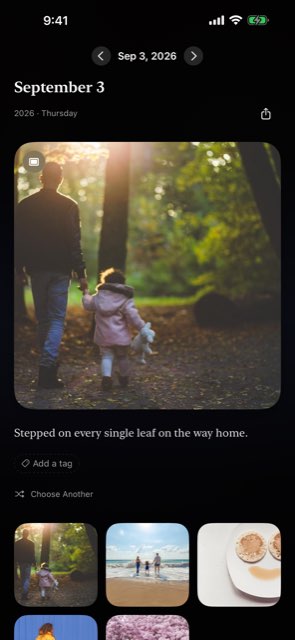
Stand an old device somewhere
Lay it on its side on a charging stand, or stand it on a shelf for a full-screen frame. The screen stays awake, so the photo stays up.
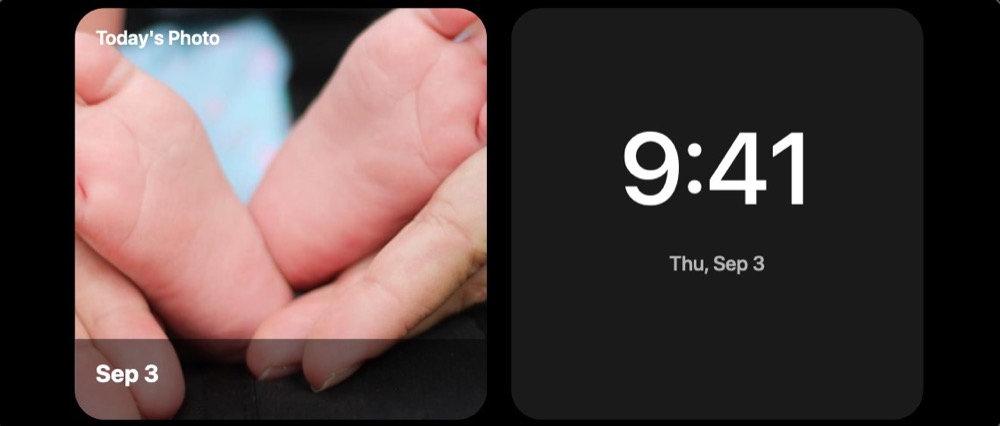
A new photo every day
At midnight it changes quietly to the new day's photo. The same photo appears in the Home Screen widget.

Where it hangs
Set it down. It's a frame.

Stand an iPad or an old iPhone on a shelf for a full-screen frame. The screen stays on, and the photo stays up.
Lay a spare iPhone on a charger, on its side, and it becomes a photo stand: today's photo appears in StandBy.
Your own record
Your own days, beautifully framed

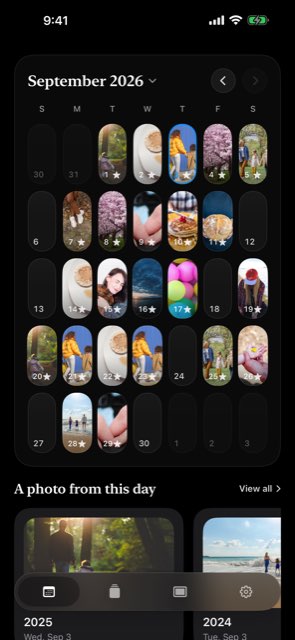
On your iPhone too, today's photo hangs in a frame. The calendar fills with one photo a day, a diary that shows you a whole year at a glance. Photos are shown from your library and, by default, never uploaded. Only if you turn on photo sync (Plus) or share with family (Family) is a copy of those photos kept in your own iCloud — never on the developer's servers.
Features
Everything else
Frame Mode
Today's photo full screen with its date and note. Three looks: full-bleed, gallery white, gallery dark. At night it turns itself off on a schedule, and the picture shifts a little over time so an old screen doesn't burn in.
Widgets and StandBy
Today's photo on the Home Screen, the Lock Screen, and StandBy. Your family gets a widget for your photo too. On iOS 27, one large widget can fill a whole Home Screen page.
On This Day
A gentle note when a photo from this day in past years exists, and a card for each year.
Notes, search, tags
Up to 300 characters a day. Search a word to find that day again. Tag days to choose what your family sees.
Empty days fill themselves
DailyAlbum sets one good photo a day automatically, favoring people and pets and skipping screenshots. All on your device.
Never lost
Turn on iCloud Sync (free) and your choices and notes survive a new phone or a reinstall. A monthly album replays last month.
Getting started
The same photo in your family's home
Just an iPhone or iPad. Free.
Install the app and open the link. Nothing to set up. Android phones and computers can't view it.
An iPhone and DailyAlbum Family
Monthly or yearly, first month free. Your own record stays free forever, with or without it. Only one photo a day arrives, so nobody has to keep up.
| Free | Plus | Family | |
|---|---|---|---|
| Plans | Free | One-time | Monthly / yearly |
| One-photo-a-day calendar, notes, search | |||
| iCloud Sync (choices and notes) | |||
| Widgets and StandBy | |||
| Frame Mode | |||
| Frame Mode without a time limit | — | ||
| Archive (a copy of each chosen photo in the app) | — | ||
| Monthly album replay | |||
| Monthly album replay, unlimited | — | ||
| Multi-device sync | — | ||
| A photo a day in your family's home | — | — |
Viewing is always free for invited family. Family starts with a free first month. Prices are shown in the App Store in your local currency. Subscriptions renew automatically and can be canceled anytime in your Apple Account settings.
Questions
FAQ
What does my family need?
An iPhone or iPad signed in to iCloud, and this app. It's free and uses none of their iCloud storage.
Where are my photos stored?
Only on your iPhone and in your own iCloud. Shared photos reach your family from your iCloud's shared area. The developer can't see your photos.
If the app goes away, are my photos gone?
No. Your photos were never moved: they stay in your own photo library, and DailyAlbum only points to them. There is no DailyAlbum server holding your photos.
Does the screen stay on all night?
No. Set a sleep schedule and the frame goes dark at night and comes back on by itself in the morning. It also shifts the picture slightly over time so an old screen doesn't burn in.
What happens if I cancel?
Your family stops receiving new days, but the days they already have stay visible. Your own records stay on your device.
Which devices are supported?
iPhone and iPad with iOS 17 or later. Android phones and computers are not supported. A TV works with AirPlay or an HDMI adapter: the TV shows only the framed photo, and the iPhone becomes the remote.